
组件通信
Vue3组件通信和Vue2的区别:
- 移出事件总线,使用
mitt代替。
vuex换成了pinia。- 把
.sync优化到了v-model里面了。 - 把
$listeners所有的东西,合并到$attrs中了。 $children被砍掉了。
常见搭配形式:
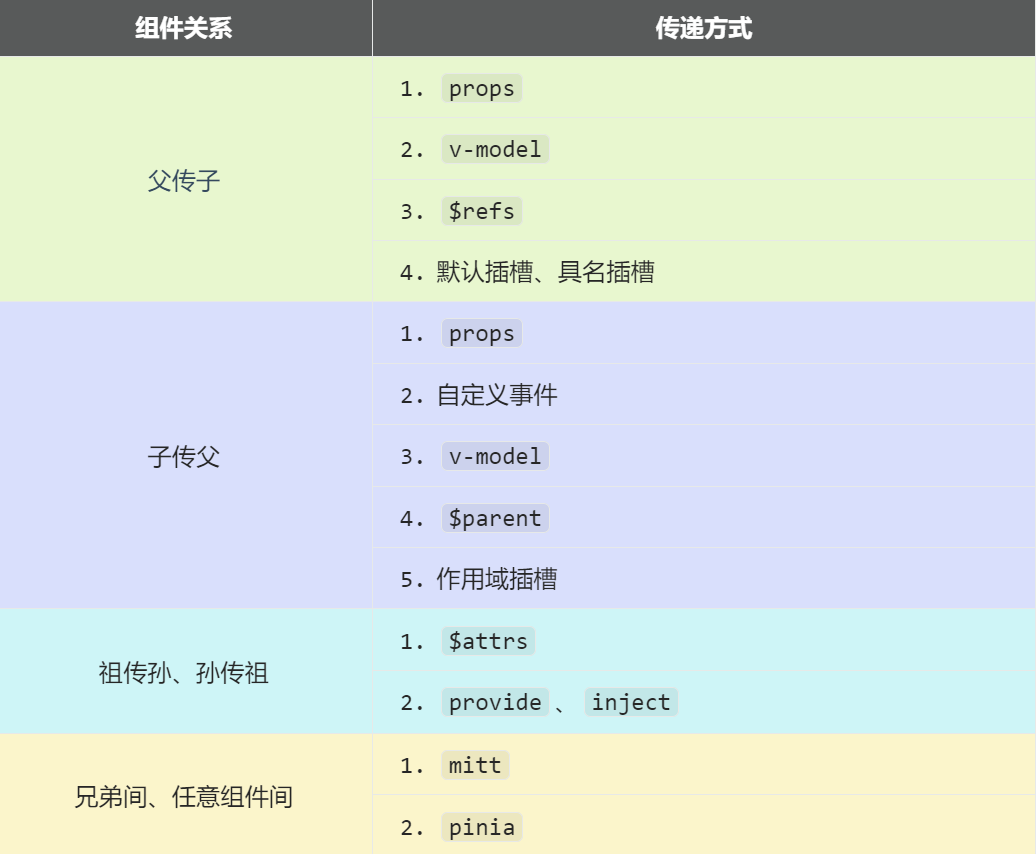
1. props
概述:props是使用频率最高的一种通信方式,常用与 :父 ↔ 子。
- 若 父传子:属性值是非函数。
- 若 子传父:属性值是函数。
父组件:
vue
<template>
  <div class="father">
    <h3>父组件,</h3>
		<h4>我的车:{{ car }}</h4>
		<h4>儿子给的玩具:{{ toy }}</h4>
		<Child :car="car" :getToy="getToy"/>
  </div>
</template>

<script setup lang="ts" name="Father">
	import Child from './Child.vue'
	import { ref } from "vue";
	// 数据
	const car = ref('奔驰')
	const toy = ref()
	// 方法
	function getToy(value:string){
		toy.value = value
	}
</script>子组件
vue
<template>
  <div class="child">
    <h3>子组件</h3>
		<h4>我的玩具:{{ toy }}</h4>
		<h4>父给我的车:{{ car }}</h4>
		<button @click="getToy(toy)">玩具给父亲</button>
  </div>
</template>

<script setup lang="ts" name="Child">
	import { ref } from "vue";
	const toy = ref('奥特曼')

    //1. 使用 defineProps 声明属性
	const props = defineProps(['car','getToy'])

    //2. 更加严格的类型声明(required是否是必需的)
    const props = defineProps({
      car: {
        type: String,
        required: true
      },
      getToy: {
        type: Function,
        required: true
      }
	});

    //3. 通过类型推导进行类型安全
    interface Props {
      car: string;
      getToy: () => void;
    }
	const props = defineProps<Props>();

</script>
</script>2. 自定义事件
1、定义一个自定义事件
vue
<!--子组件  -->
<template>
	<button @click="handleClick">点击我</button>
</template>

<script setup>
	// 定义自定义事件
	const emit = defineEmits(['my-event']);

	const handleClick = () => {
		// 触发自定义事件,并传递数据
		emit('my-event', 'Hello from child component!');
	};
</script>

<!--在父组件中监听这个事件:  -->
<template>
	<ChildComponent @my-event="handleMyEvent" />
</template>

<script setup>
	const handleMyEvent = (message) => {
		console.log(message); // 输出: "Hello from child component!"
	};
</script>2、带类型检查的自定义事件
vue
<template>
	<button @click="handleClick">点击我</button>
</template>

<script setup>
	// 定义带类型检查的自定义事件
	const emit = defineEmits({
		// 定义一个事件,接受一个字符串参数
		'my-event': (payload: string) => {
			// 校验 payload 是否为字符串
			if (typeof payload === 'string') {
				return true; // 校验通过
			} else {
				console.warn('Invalid payload type!');
				return false; // 校验失败
			}
		},
	});

	const handleClick = () => {
		// 触发自定义事件,并传递数据
		emit('my-event', 'Hello from child component!');
	};
</script>3、多个自定义事件
vue
<!--子组件定义事件:  -->
<template>
	<button @click="handleClick">点击我</button>
	<button @click="handleAnotherClick">另一个事件</button>
</template>

<script setup>
	// 定义多个自定义事件
	const emit = defineEmits(['my-event', 'another-event']);

	const handleClick = () => {
		emit('my-event', 'Hello from my-event!');
	};

	const handleAnotherClick = () => {
		emit('another-event', 'Hello from another-event!');
	};
</script>

<!--在父组件中监听多个个事件:  -->
<template>
	<ChildComponent @my-event="handleMyEvent" @another-event="handleAnotherEvent" />
</template>

<script setup>
	const handleMyEvent = (message) => {
		console.log(message); // 输出: "Hello from my-event!"
	};

	const handleAnotherEvent = (message) => {
		console.log(message); // 输出: "Hello from another-event!"
	};
</script>4、defineEmits 和 defineProps
vue
<!--子组件定义事件并用props接受属性:  -->
<template>
	<div>
		<p>{{ message }}</p>
		<button @click="handleClick">点击我</button>
	</div>
</template>

<script setup>
	// 定义 props
	const props = defineProps({
		message: {
			type: String,
			required: true,
		},
	});

	// 定义自定义事件
	const emit = defineEmits(['update-message']);

	const handleClick = () => {
		// 触发自定义事件,并传递新消息
		emit('update-message', 'New message from child!');
	};
</script>


<!--在父组件中监听多个事件并发送属性:  -->
<template>
	<ChildComponent :message="message" @update-message="handleUpdateMessage" />
</template>

<script setup>
	import { ref } from 'vue';

	const message = ref('Hello from parent!');

	const handleUpdateMessage = (newMessage) => {
		message.value = newMessage;
	};
</script>3. mitt
概述:与消息订阅与发布(pubsub)功能类似,可以实现任意组件间通信。
安装mitt
shell
npm i mitt新建文件:src\utils\emitter.ts
javascript
// 引入mitt
import mitt from "mitt";

// 创建emitter
const emitter = mitt()

/*
  // 绑定事件
  emitter.on('abc',(value)=>{
    console.log('abc事件被触发',value)
  })
  emitter.on('xyz',(value)=>{
    console.log('xyz事件被触发',value)
  })

  setInterval(() => {
    // 触发事件
    emitter.emit('abc',666)
    emitter.emit('xyz',777)
  }, 1000);

  setTimeout(() => {
    // 清理事件
    emitter.all.clear()
  }, 3000);
*/

// 创建并暴露mitt
export default emitter接收数据的组件中:绑定事件、同时在销毁前解绑事件:
typescript
import emitter from "@/utils/emitter";
import { onUnmounted } from "vue";

// 绑定事件
emitter.on('send-toy',(value)=>{
  console.log('send-toy事件被触发',value)
})

onUnmounted(()=>{
  // 解绑事件
  emitter.off('send-toy')
})【第三步】:提供数据的组件,在合适的时候触发事件
javascript
import emitter from "@/utils/emitter";

function sendToy(){
  // 触发事件
  emitter.emit('send-toy',toy.value)
}注意这个重要的内置关系,总线依赖着这个内置关系
4. v-model
概述:实现 父↔子 之间相互通信。
前序知识 ——
v-model的本质vue<!-- 使用v-model指令 --> <input type="text" v-model="userName"> <!-- v-model的本质是下面这行代码 --> <input type="text" :value="userName" @input="userName =(<HTMLInputElement>$event.target).value" >组件标签上的
v-model的本质::moldeValue+update:modelValue事件。vue<!-- 组件标签上使用v-model指令 --> <AtguiguInput v-model="userName"/> <!-- 组件标签上v-model的本质 --> <AtguiguInput :modelValue="userName" @update:model-value="userName = $event"/>AtguiguInput组件中:vue<template> <div class="box"> <!--将接收的value值赋给input元素的value属性,目的是:为了呈现数据 --> <!--给input元素绑定原生input事件,触发input事件时,进而触发update:model-value事件--> <input type="text" :value="modelValue" @input="emit('update:model-value',$event.target.value)" > </div> </template> <script setup lang="ts" name="AtguiguInput"> // 接收props defineProps(['modelValue']) // 声明事件 const emit = defineEmits(['update:model-value']) </script>也可以更换
value,例如改成abcvue<!-- 也可以更换value,例如改成abc--> <AtguiguInput v-model:abc="userName"/> <!-- 上面代码的本质如下 --> <AtguiguInput :abc="userName" @update:abc="userName = $event"/>AtguiguInput组件中:vue<template> <div class="box"> <input type="text" :value="abc" @input="emit('update:abc',$event.target.value)" > </div> </template> <script setup lang="ts" name="AtguiguInput"> // 接收props defineProps(['abc']) // 声明事件 const emit = defineEmits(['update:abc']) </script>如果
value可以更换,那么就可以在组件标签上多次使用v-modelvue<AtguiguInput v-model:abc="userName" v-model:xyz="password"/>
5. $attrs
概述:
$attrs用于实现当前组件的父组件,向当前组件的子组件通信(祖→孙)。具体说明:
$attrs是一个对象,包含所有父组件传入的标签属性。注意:
$attrs会自动排除props中声明的属性(可以认为声明过的props被子组件自己“消费”了)
父组件:
vue
<template>
  <div class="father">
    <h3>父组件</h3>
		<Child :a="a" :b="b" :c="c" :d="d" v-bind="{x:100,y:200}" :updateA="updateA"/>
  </div>
</template>

<script setup lang="ts" name="Father">
	import Child from './Child.vue'
	import { ref } from "vue";
	let a = ref(1)
	let b = ref(2)
	let c = ref(3)
	let d = ref(4)

	function updateA(value){
		a.value = value
	}
</script>子组件:
vue
<template>
	<div class="child">
		<h3>子组件</h3>
		<GrandChild v-bind="$attrs"/>
	</div>
</template>

<script setup lang="ts" name="Child">
	import GrandChild from './GrandChild.vue'
</script>孙组件:
vue
<template>
	<div class="grand-child">
		<h3>孙组件</h3>
		<h4>a:{{ a }}</h4>
		<h4>b:{{ b }}</h4>
		<h4>c:{{ c }}</h4>
		<h4>d:{{ d }}</h4>
		<h4>x:{{ x }}</h4>
		<h4>y:{{ y }}</h4>
		<button @click="updateA(666)">点我更新A</button>
	</div>
</template>

<script setup lang="ts" name="GrandChild">
	defineProps(['a','b','c','d','x','y','updateA'])
</script>6. $refs、$parent
概述:
$refs用于 :父→子。$parent用于:子→父。
原理如下:
属性 说明 $refs值为对象,包含所有被 ref属性标识的DOM元素或组件实例。$parent值为对象,当前组件的父组件实例对象。
7. provide、inject
概述:实现祖孙组件直接通信
具体使用:
- 在祖先组件中通过
provide配置向后代组件提供数据 - 在后代组件中通过
inject配置来声明接收数据
- 在祖先组件中通过
具体编码:
【第一步】父组件中,使用
provide提供数据vue<template> <div class="father"> <h3>父组件</h3> <h4>资产:{{ money }}</h4> <h4>汽车:{{ car }}</h4> <button @click="money += 1">资产+1</button> <button @click="car.price += 1">汽车价格+1</button> <Child/> </div> </template> <script setup lang="ts" name="Father"> import Child from './Child.vue' import { ref,reactive,provide } from "vue"; // 数据 let money = ref(100) let car = reactive({ brand:'奔驰', price:100 }) // 用于更新money的方法 function updateMoney(value:number){ money.value += value } // 提供数据 provide('moneyContext',{money,updateMoney}) provide('car',car) </script>注意:子组件中不用编写任何东西,是不受到任何打扰的
【第二步】孙组件中使用
inject配置项接受数据。vue<template> <div class="grand-child"> <h3>我是孙组件</h3> <h4>资产:{{ money }}</h4> <h4>汽车:{{ car }}</h4> <button @click="updateMoney(6)">点我</button> </div> </template> <script setup lang="ts" name="GrandChild"> import { inject } from 'vue'; // 注入数据 let {money,updateMoney} = inject('moneyContext',{money:0,updateMoney:(x:number)=>{}}) let car = inject('car') </script>